

Product News · App Store Launch · July 2026 · 14 min read
Wisen is live on the App Store. After months in TestFlight, after builds that got rejected and builds that finally didn’t, after watching real people use the app and tell us exactly what wasn’t working yet, it’s done. Anyone with an iPhone can download it today.
If you’re new here: Wisen is an AI note-taking app built around one idea. A note you never look at again isn’t knowledge, it’s just a file taking up space. Wisen tries to fix that. Echo brings your notes back at the right moment, Pulse turns them into something you can actually send or publish, and a Knowledge Map shows how your ideas connect without you lifting a finger.
This post covers what actually changes now that Wisen is out of beta, what the app does feature by feature, how it stacks up against whatever notes app is already on your phone, and the questions people keep asking us. Grab the download link below, then come back for the rest whenever you’ve got some time.

Wisen Is Officially Live on the App Store
For the last stretch, Wisen has lived on TestFlight, Apple’s way of letting a small group of real people use an app before anyone else can. A generous group of beta testers spent that time finding bugs, asking for features, and telling us, more than once, exactly what was confusing about the app. All of that fed into what’s live today.
Being on the App Store instead of TestFlight changes a few practical things. You don’t need an invite code or a TestFlight link anymore, you can just search for Wisen directly. Builds update automatically instead of expiring every 90 days. And Wisen now shows up in Apple’s own search results, which means if you’ve been looking for an AI note-taking app, a personal knowledge management app for iPhone, or something that isn’t just another flashcard app, there’s a decent chance that’s how you landed on this page.

The Problem With Every Note You’ve Ever “Saved for Later”
Open your notes app right now. Scroll back three months. How many of those notes have you actually reopened since you wrote them?
For most people, the honest answer is close to zero. That’s not a discipline problem. It’s what happens when an app’s only job is storage. Notion, Apple Notes, Evernote, and Obsidian without a lot of manual setup are all built to hold what you put in them. None of them are built to bring it back. We put several of the biggest names through a full feature-by-feature test if you want the details: Notion, Obsidian, Evernote: Why the Best Notes Apps Still Can’t Make You Learn.
We kept running into the same wall ourselves. Ideas from a podcast, a half-finished argument from a meeting, a quote that reframed how we thought about a problem, all of it went into a notes app and never came out again. The notes weren’t bad. The system holding them just wasn’t doing anything with them.
Three things had to be true for Wisen to actually fix that:
- Notes needed to connect to each other automatically, based on what they actually mean, not on folders or tags you have to maintain by hand
- Notes needed to come back on their own, at a moment when they’re actually useful, instead of waiting for you to remember to search
- The app needed to test what you know, gently, so writing something down became a step toward remembering it instead of the last time you’d ever think about it
Echo, Pulse, and the Knowledge Map are our answer to those three things. If you want the longer version of this argument, including the research behind it, we wrote a full guide to thinking systems and personal knowledge management. Here’s the short version of what each feature actually does.
What’s Actually Inside Wisen
Tap through each one below to see what it does.
Echo brings old notes back at the right time
Echo quietly resurfaces notes you’ve already written, as home screen widgets and in-app cards, so ideas don’t disappear the moment you stop looking for them.
You’re not being quizzed. You’re being reminded, right when it’s actually useful.
Pulse turns your notes into something you can send
Every day, Pulse pulls together a short brief from what you’ve written, plus draft suggestions like LinkedIn posts, emails, and summaries, built from your own notes instead of a blank page.
Your notes stop being a place ideas go to disappear and start being a place they go to get finished.
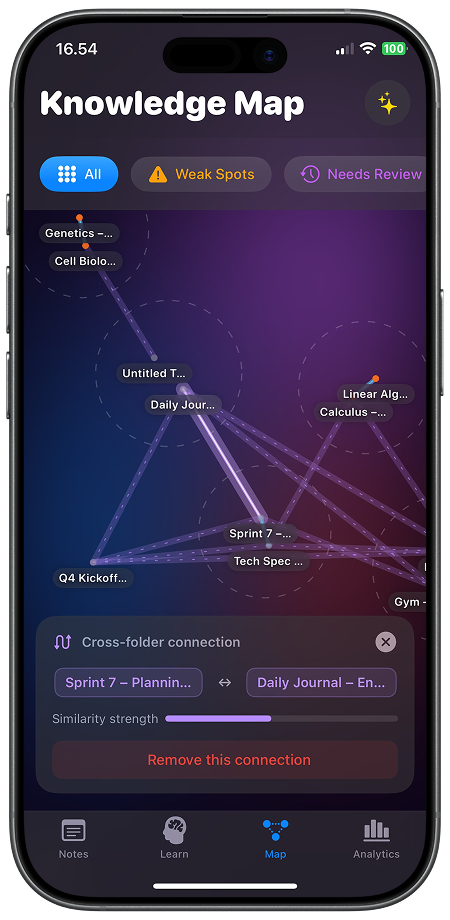
Knowledge Map shows how your ideas actually connect
Wisen reads the meaning behind your notes and links the ones that relate, even if they came from completely different subjects weeks apart. No tags, no manual linking.
Open the map and you’ll see clusters form around what you actually think about.
AI Chat quizzes you on what you actually wrote
Ask questions about your own notes, or let Wisen ask you. Study sessions are built entirely from your content, not generic flashcards, so you’re always practicing recall on things you actually need to know.
Answer in your own words. Wisen grades based on what your notes say, not on matching an exact phrase.
Curious how the Knowledge Map actually finds those connections behind the scenes? We go deeper in The Second Brain Explained and in Brilliant Ideas Are Hidden in Your Notes.
A Few Terms Worth Knowing
If some of this vocabulary is new, here’s the short version of each term this post keeps using.
- Second brain
- A system, usually digital, that stores and connects what you learn so you don’t have to hold it all in your head. We go deeper on what that looks like in practice in The Second Brain Explained.
- Zettelkasten
- A note-linking method built around small, connected notes, developed by sociologist Niklas Luhmann. Wisen’s Knowledge Map automates the linking part of it.
- Active recall
- Testing yourself on information instead of just rereading it. It’s one of the most well-documented ways to actually retain what you learn, and it’s the entire premise behind AI Chat. More on the research in How to Remember What You Study.
- Spaced repetition
- Revisiting information at increasing intervals so it moves into long-term memory instead of fading after a day or two. Wisen tracks this at the individual content block level, not just per note.
Wisen vs. the Notes App You’re Already Using
You probably already have a notes app. Here’s the honest comparison, not a list of fifty features nobody checks, just the things that actually change how useful your notes end up being.
| App | Best for | Organizes itself | Tests your recall | Price |
|---|---|---|---|---|
| Apple Notes | Quick capture | No | No | Free |
| Notion | Databases, team docs | No | No | Free / paid tiers |
| Obsidian | Manual linking, plugins | With plugins | With plugins | Free / paid sync |
| Evernote | Archiving, search | No | No | Free / paid tiers |
| Wisen | Notes that turn into knowledge | Yes, automatically | Yes, with AI Chat | Free |
A little more detail on each, since “organizes itself” and “tests your recall” don’t tell the whole story.
- Wisen vs Notion: Notion is excellent for databases, team wikis, and project trackers. It isn’t built to bring old content back to you or test whether you remember it. Wisen is built around exactly that gap.
- Wisen vs Obsidian: Obsidian’s local graph view is genuinely good, and its plugin ecosystem can replicate a lot of what Wisen does. The tradeoff is setup time. Wisen’s Knowledge Map and Echo work the moment you install the app, no plugins required.
- Wisen vs Apple Notes: Apple Notes is fast, free, and already on your phone, but it’s just a list. No resurfacing, no connections, no sense of what you’ve actually retained. For quick capture, it’s fine. For anything you want to keep thinking about, it runs out of road fast.
- Wisen vs Evernote: Evernote built its name on search and archiving, and it’s still solid at both. Like the others, it stops at storage.
We put all four through a longer, feature-by-feature test if you want the full picture: Notion, Obsidian, Evernote: Why the Best Notes Apps Still Can’t Make You Learn.
The Road to the App Store
Launching isn’t a single moment, even though it feels like one. Here’s the version with the boring parts included.
Notes that don’t do anything felt like a broken promise
Wisen started as a question: what if a notes app actually did something with what you wrote, instead of just storing it.
Built from scratch in Swift and SwiftUI
Echo, Pulse, and the Knowledge Map were built as native iOS features, not a web app in a wrapper, so the app stays fast even with a large note library.
Real users, real feedback, real rewrites
Beta testers found the bugs, pushed back on confusing flows, and shaped features that shipped very differently than they were first designed.
Live on the App Store
No invite code, no waitlist. Wisen is available to anyone with an iPhone running iOS 16 or later.
How to Get the Most Out of Wisen in Your First Week
A few things that make the first week noticeably better, based on what beta testers told us:
- Write however you already write. Voice memo after a meeting, a photo of a whiteboard, a typed thought at 11pm, all of it goes into the same system. Don’t wait for the “right” format.
- Let Echo run for a few days before judging it. The first resurfaced notes are the easy ones. The genuinely useful connections tend to show up in week two, once there’s more to work with.
- Open the Knowledge Map early. Seeing your notes as a graph, even a small one, changes how you write the next one.
- Use AI Chat on something you already half-remember. It’s a better first test than starting from a blank note, since you’ll immediately feel whether the grading matches how you actually think.
- Check Pulse in the morning, not at night. The daily brief is built to be a starting point for the day, not a recap of it.
If you want the research behind why any of this works, we’ve written more on the science of memory and retention: How to Remember What You Read: 8 Science-Backed Strategies and How to Remember What You Study.
Who Wisen Actually Works For
Wisen isn’t trying to replace every app on your phone. It’s built for a specific kind of frustration. You’ll probably recognize yourself in at least one of these:
- Students who take lecture notes and only think about them again the night before an exam
- People learning something on their own, a language, a skill, a new field, with no single place that connects it all
- Professionals who sit in meetings, read reports, and save good ideas that never get used again
- Anyone who downloaded a flashcard app, made twelve cards, and never opened it again
- Content creators and founders who have good ideas constantly and nowhere fast to turn them into a post or an email
If none of that sounds like you, that’s fine too. Notion is still better for team databases. Apple Notes is still faster for a two-second grocery list. Wisen is for the notes you actually want to keep thinking about, the kind covered in our complete guide to note-taking.
Why Now: Notes Apps Are Having a Moment
Wisen isn’t launching into a quiet market. A few numbers worth knowing:
| Trend | What the data shows | Source |
|---|---|---|
| Market growth | One 2026 market analysis puts the personal knowledge management software category at $1.8 billion, growing toward $4.9 billion by 2034, roughly 12% a year. | Dataintelo, 2026 |
| What’s driving it | AI integration shows up as the single most cited growth driver across nearly every major analysis of knowledge and note-taking software published in 2026. | Technavio, 2026 |
| Where it’s happening | Cloud-based tools already make up roughly 73% of the personal knowledge management market, with mobile-first apps as the fastest-growing slice of it. | Dataintelo, 2026 |
Your Notes Stay Yours
Everything you write in Wisen is encrypted on your device with AES-256-GCM before it ever reaches our servers. That means your notes are unreadable to us, even while they’re synced to the cloud so you can pick up on another device. The full breakdown is in our Privacy Policy.
AI Chat is the one exception. When you start a study session or ask a question, that specific note’s content is sent to OpenAI’s models to generate the response, the same way any AI chat feature works. Echo, the Knowledge Map, and search all run directly on your phone and never leave it.
Free · iPhone · iOS 16+
Frequently Asked Questions
Is Wisen free to download?
Yes. Wisen is free to download on the App Store, no account required to start.
What makes Wisen different from a regular note-taking app?
Most notes apps store what you write. Wisen does something with it. Echo resurfaces old notes automatically, the Knowledge Map connects them without manual tagging, and AI Chat tests your recall, so notes turn into things you actually remember instead of files you saved once.
Is Wisen available on Android?
Not yet. Wisen is built natively in Swift and SwiftUI for iOS, which is a big part of why it feels fast. iOS is the only platform for now.
Is my data private and encrypted?
Yes. Notes are encrypted on your device with AES-256-GCM before they sync to the cloud, so they’re unreadable to anyone but you. The one exception is AI Chat, where a note’s content is sent to OpenAI’s models to generate a response when you actively start a session. Full details in our Privacy Policy.
What’s the difference between Echo and Pulse?
Echo resurfaces notes you’ve already written, as reminders and home screen widgets, so old ideas don’t disappear. Pulse looks forward instead of back, generating a daily brief and draft content like LinkedIn posts or emails from what you’ve recently written.
Can I import notes I already have from another app?
Yes. Wisen can import PDFs, images, and scanned documents and turn them into structured, editable notes using built-in OCR, so you don’t have to start your knowledge base from zero.
What iPhone and iOS version do I need?
Wisen requires iOS 16 or later. It’s built for iPhone, and there’s no Android version yet.
Do I need an account to use Wisen?
No account is required to start using Wisen.
What is a knowledge graph, and why does Wisen build one automatically?
A knowledge graph is a visual map of how pieces of information relate to each other. Wisen builds yours automatically by reading the meaning in your notes, no manual tagging required. It’s the same idea behind the Knowledge Map feature.
Is Wisen good for students?
Yes, it’s one of the most common uses. Lecture notes, textbook highlights, and study sessions all feed into the same system, and AI Chat turns that content into practice questions ahead of an exam instead of a last-minute cram.
How is Wisen different from a flashcard app like Anki?
Anki requires you to manually write every card. Wisen generates questions directly from notes you were already going to take, so there’s no separate step of turning notes into study material.
Have a question that isn’t covered here? See the full Wisen FAQ.
Your notes have been trying to tell you something for a while now: that the version of you six months ago already worked this out, wrote it down, and then lost it in a folder you forgot existed. Wisen is what happens when an app actually holds up its end of that deal.
It’s live. It’s free. It’s on the App Store right now.
Leave a Reply