
Knowledge Management · March 2026 · 8 min read
There are hundreds of note-taking apps. Many are beautiful. Others are genuinely powerful. A few have been in active development for a decade by teams who clearly care about the product. And yet, the fundamental problem remains unsolved: your notes sit there, and you slowly forget everything in them.
This isn’t a rant about bad tools. Notion is genuinely good. Obsidian has built one of the most passionate user communities in software. Apple Notes works for millions of people. The issue isn’t quality — it’s category. These are storage tools pretending to be knowledge tools, and there’s a meaningful difference.
- What We Actually Mean by a Knowledge System
- Notes Apps Compared: What They're Good At (and What They're Not)
- The Static Notes Problem Nobody Talks About
- What an Active Knowledge System Actually Does
- Input Everything: How a Real Knowledge System Handles Your Mess
- Knowledge Maps: When Your Notes Start Talking to Each Other
- Echos and Reminders: The Gentle Side of an Active System
- Who Actually Needs This Kind of System
- FAQ
What We Actually Mean by a Knowledge System
People throw around the phrase “personal knowledge management” (PKM) a lot in productivity circles. It sounds complicated, but the idea behind it is simple: how do you turn information you encounter into knowledge you actually keep?
A notes app answers a different question: where do I put things so I can find them later? Both are useful. They are, however, not the same thing.
A knowledge system has to do at least three things a storage tool doesn’t. Specifically, it has to help you understand connections between ideas, prompt you to engage with information at the right time, and adapt to what you actually know versus what you think you know. Most apps handle none of these.
“The goal of knowledge management isn’t to store more — it’s to forget less of what matters.”
Notes Apps Compared: What They’re Good At (and What They’re Not)
Before going further, it’s worth being fair. The major notes apps each do something genuinely well. Here’s an honest breakdown.
| App | Organisation | Search | Input Types | Learning / Recall | Knowledge Links | AI Study |
|---|---|---|---|---|---|---|
| Notion | Excellent | Good | Text, images, embeds | None | Manual only | No |
| Obsidian | Very good | Excellent | Markdown, plugins | Via plugin (Anki) | Manual linking | No |
| Evernote | Good | Very good | Text, web clips, docs | None | None | No |
| Apple Notes | Basic | Good | Text, drawings, photos | None | None | No |
| Wisen | Folders + nested | Good | Text, audio, scans, PDFs, photos, handwriting, docs | AI-powered, spaced | Automatic map | Yes |
The pattern is obvious. When it comes to capturing and organising information, the established apps are strong. When it comes to doing anything with that information after you save it, almost all of them stop completely.
The Static Notes Problem Nobody Talks About
Here’s a scenario that will feel familiar. You spend an hour taking solid notes from a book, podcast, or course and save them somewhere organised. Six months later, the topic rings a bell, but the specifics are gone. So you search for the notes, skim them, feel like you’ve reviewed them, and close the app. Nothing sticks.
This isn’t a motivation problem. It’s a design problem. The app did exactly what it was built to do — store your notes. It simply wasn’t designed to do what you actually needed, which is help you retain what was in them.
Static notes age badly. The longer your notes library grows, the harder navigation becomes. You end up with hundreds of files you’ve visited once and forgotten. Over time, the notes don’t gain value — they become background noise.
“Most people’s note-taking systems are just slow-motion forgetting machines with better search.”
Tiago Forte popularised the concept of a second brain — treating your notes as an external thinking tool. It’s a good framework. In practice, though, it still relies heavily on your own discipline to revisit and engage with notes regularly. Most people simply don’t.

What an Active Knowledge System Actually Does
An active knowledge system doesn’t wait for you to return to it. Instead, it comes to you, at the right moment, with the right material.
Learning science has established the core mechanics behind this clearly. Spaced repetition schedules review of material just before you’d naturally forget it. Active recall, meanwhile, asks you to retrieve information rather than passively re-read it. Together, these two methods produce dramatically better long-term memory than any amount of re-reading or highlighting.
The problem has always been effort. Applying these techniques manually — creating flashcards, scheduling review sessions, tracking what you know versus don’t know — takes more time than most people are willing to spend. As a result, they skip it, and the forgetting continues.
An active system removes that friction. It reads your notes, identifies what’s worth reinforcing, generates questions based on your actual content, and surfaces them when the timing is right. It also tracks your weak points over time, so the sessions adapt to where you actually struggle — not just what you wrote down last.
This is what Wisen is built around. The notes themselves stay the same. What changes is that they no longer just sit there — the system turns them into an ongoing study loop without you having to manage it manually.
Input Everything: How a Real Knowledge System Handles Your Mess
One reason people end up scattered across multiple apps is that real life produces information in too many formats for any single tool to handle well. You have handwritten pages from a lecture, a PDF someone sent you, a voice memo from a walk, photos of whiteboard diagrams, and audio from a podcast. Most apps handle one or two of these reasonably well and simply ignore the rest.
A proper knowledge system needs to accept all of it and treat it the same way. That means converting handwritten notes to searchable text, pulling content from PDFs and slides, transcribing audio, and letting you draw or sketch directly into the same environment where you type.
The point here isn’t to show off a feature list. Fragmented input leads to fragmented knowledge, and if half your notes live in one app and half somewhere else, no system can help you connect them. Getting everything into one place — in a format the system can actually read and work with — is therefore a prerequisite for everything else.
Wisen accepts handwritten notes, typed text, PDFs, photos of notes or slides, audio recordings, and documents. Everything gets converted into notes the AI can use in study sessions. The organisation is straightforward — folders and nested folders, the same structure most people already think in.
Knowledge Maps: When Your Notes Start Talking to Each Other
Obsidian has popularised the idea of a graph view — a visual map of how your notes link together. It’s a genuinely useful concept. The limitation, however, is that Obsidian only shows links you’ve created manually. If you haven’t drawn the line between two notes yourself, the system doesn’t know there’s a connection.
Automatically detecting relationships between ideas is a much harder problem, and it’s precisely where AI earns its place in a knowledge tool. When a system reads all your notes, it can identify when ideas overlap, when a note from three months ago connects conceptually to something you wrote last week, and when patterns emerge across different subjects.
“The most valuable insight is often the one connecting two things you never thought to connect yourself.”
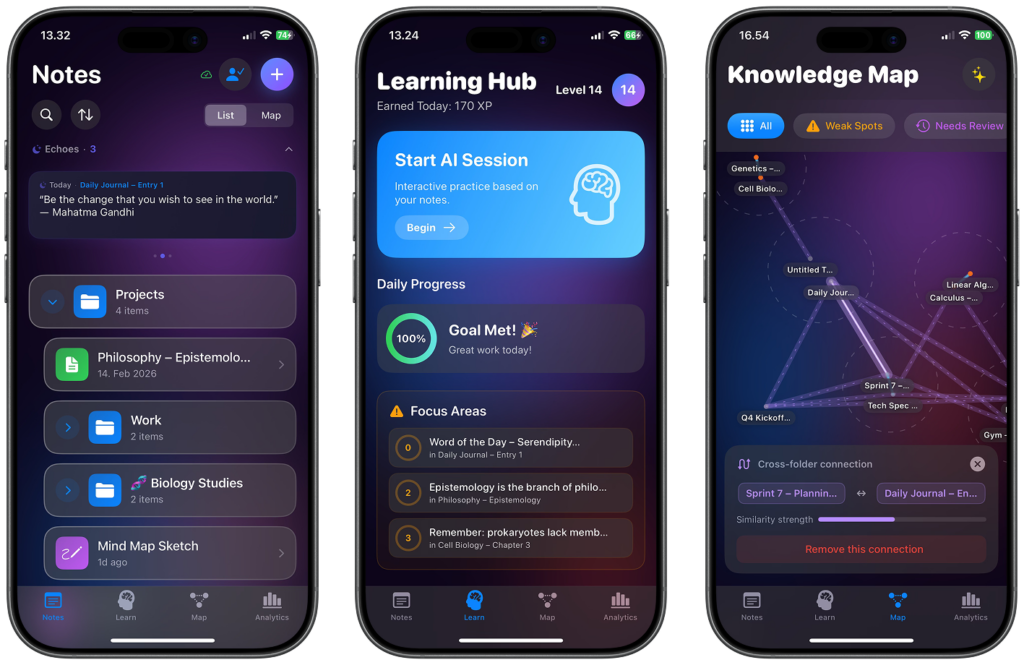
Wisen’s Knowledge Map does this automatically. It surfaces connections you didn’t make explicitly, showing you how ideas across different folders and subjects relate to each other. For anyone working across multiple areas — a student taking several courses, a professional who reads across disciplines — this reveals links that are genuinely useful and wouldn’t be obvious from a folder structure alone.
Echos and Reminders: The Gentle Side of an Active System
Not everything you write down needs to be learned by heart. This is an important distinction that most pure study tools miss entirely.
Some notes contain information you need to retain deeply — definitions, frameworks, facts you’ll be tested on, or concepts that underpin other things you’re learning. Those deserve active recall sessions and spaced repetition.
Other notes are reminders, references, or things you want to stay vaguely aware of without drilling them. A quote you found interesting. A recommendation someone made. A meeting summary. You don’t want to forget these completely, but you also don’t want to turn them into flashcard study material.
Wisen handles this distinction with what it calls Echos — light, periodic reminders that surface notes you haven’t engaged with in a while, turning passive archives into occasional prompts. It’s a nudge rather than a test. The note comes back to you, you read it, and you move on. There’s no pressure to study it — just a gentle signal that keeps information from going completely dark.
Because of this, the system stays useful for a wider range of content than a pure study app ever could. Your professional notes, reading highlights, and personal reflections all stay relevant rather than disappearing into a growing pile of files you never open.
Who Actually Needs This Kind of System
The honest answer is: not everyone. If you use notes as a scratchpad and don’t care about retaining the content, a simple app is absolutely the right tool. Notes apps aren’t broken — they just aren’t designed for learning.
An active knowledge system makes sense if you recognise yourself in any of these situations.
| Situation | The Problem | What an Active System Does |
|---|---|---|
| University student with lecture notes | Students don’t study notes effectively after class | Converts notes into spaced review sessions automatically |
| Professional taking meeting or research notes | Professionals capture information but rarely revisit it | Echos resurface relevant notes; AI identifies connections across topics |
| Language learner building vocabulary | Words and phrases pile up without reinforcement | Active recall sessions target weak points and schedule reviews at optimal intervals |
| Reader who annotates books and articles | Users save highlights and summaries, then forget them | System prompts engagement with saved material over time |
| Anyone studying across multiple subjects | No visibility into how ideas connect | Knowledge Map reveals relationships across folders automatically |
The common thread is people who already put in the work to capture information but get little back from it. The notes exist. The problem is what happens — or doesn’t happen — next.
Wisen doesn’t try to replace how you write. Instead, it changes what your notes do after you write them. The analytics view lets you track learning activity over time — not to gamify studying, but to give you a clear picture of which topics you’ve engaged with and which have gone untouched for too long.
FAQ
Is Wisen a replacement for Notion or Obsidian?
It depends on how you use those apps. Notion works brilliantly for project management or database-style organisation — and Wisen doesn’t try to replace that. For users who rely on Notion, Obsidian, or similar tools as a place to capture and organise knowledge they want to actually retain, however, Wisen is a more suitable fit. It’s built specifically for learning from notes, not just managing them.
What file types can I import into Wisen?
Wisen accepts typed notes, handwritten notes (via scan or photo), PDFs, document files, images of slides or whiteboards, audio recordings, and photos of written notes. The app converts all of these into editable, searchable notes that the AI can use in study sessions.
Do I have to turn every note into a study session?
No. The system lets you decide which notes are meant for active study and which are better suited to the lighter Echo reminders. You’re not forced to quiz yourself on everything — just the material you actually want to retain deeply.
How does the AI know what to ask me during a study session?
The AI reads the content of your notes and generates questions based on what’s actually in them. It also tracks your answers over time to identify weak areas — topics or concepts you consistently struggle with — and prioritises those in future sessions. The questions adapt to your performance, not just your syllabus.
What is a Knowledge Map and how does it work?
The Knowledge Map is an automatically generated visual graph that shows how your notes relate to each other. Unlike Obsidian’s graph view, which only shows links you’ve created manually, Wisen’s map is built by the AI reading all your notes and identifying conceptual connections. You see the full picture of how your knowledge fits together — including links you wouldn’t have drawn yourself.
Is Wisen only for students?
No. Students are a natural fit because the study mechanics map directly onto exam prep and course review. But the system is equally useful for professionals who read and research heavily, language learners, people building expertise in a new field, or anyone who takes notes regularly and wants to actually benefit from the habit long-term.
What is spaced repetition and why does it matter for note-taking?
Spaced repetition is a learning technique where you review material at increasing intervals — shortly after learning, then a few days later, then a week later, and so on. Each review happens just before you’d naturally forget the material. Research consistently shows this approach leads to much stronger long-term retention than cramming or re-reading. For note-taking specifically, it means your notes don’t just get written and forgotten — instead, they get revisited at the right moments to actually stick.
Is my data private?
Yes. Wisen’s AI analysis runs on your own content only, with no data shared with third parties or used for model training. Your notes stay yours.
Try out Wisen today.
Leave a Reply