
Learning & Productivity · March 2026 · 10 min read
- The Quiet Failure of Every Note You Have Ever Saved
- What "Active Notes" Actually Means
- How Wisen Makes Your Notes Active Feature by Feature
- Every Format, One System
- The Knowledge Graph That Builds Itself
- What the Graph Actually Shows You
- Built for Large Libraries
- AI Study Sessions That Know What You Don't Know
- What Sets It Apart From Flashcard Apps
- Echo: The Resurfacing System That Doesn't Drill You
- Gamification That Actually Makes You Open the App
- Wisen vs Traditional Note-Taking Apps — A Direct Comparison
- Who Gets the Most Out of Wisen
- Frequently Asked Questions About Wisen
There is a specific kind of frustration that productive people rarely talk about. It happens when you open your notes app to find something you saved weeks ago — and you cannot find it. Not because the search failed, but because you have so many notes, from so many places, captured across so many different moments, that the thing you want has effectively vanished inside its own archive.
This is the hidden cost of how most people use note-taking apps. And it is not a personal failing — it is a design problem.
Most note-taking apps focus on capture. They excel at receiving information. However, they ignore the part that matters most: turning captured information into something you actually know, remember, and can use. That is the gap Wisen set out to close.
The Quiet Failure of Every Note You Have Ever Saved
Think about the last fifty notes you created. Where are they now? Still in a folder somewhere, probably. Maybe organised, maybe not. Here is the real question, though: how many of those notes have actively changed the way you think, work, or make decisions since you wrote them?
If the honest answer is “not many,” you are not alone. Research on the generation effect and active recall consistently shows that passive storage — reading, highlighting, even summarising — produces far weaker memory retention than active retrieval. Writing a note, therefore, is one of the weakest things you can do for long-term learning. What matters is what happens after you write it.
Standard note-taking tools — Notion, Apple Notes, Obsidian, Bear, Evernote and so on — function, fundamentally, as archiving systems. Each solves the capture problem well. However, none of them does anything meaningful about the retention problem. For most people with more than a few hundred notes, retention is the only problem that actually matters anymore.
“The value of a note is not in the moment it is written. It is in the moment it resurfaces — connected, relevant, and ready to be used.”
Why Capturing More Makes It Worse
Your notes are not the problem. The system holding them is. A static archive grows harder to use the more you add to it. Eventually, adding a new note becomes an act of optimism rather than utility. You save it knowing, on some level, that you will never come back to it.

What “Active Notes” Actually Means
Productivity circles use the phrase “active notes” loosely, but it has a specific meaning worth pinning down. A note becomes active when the system holding it does something with it — not just stores it.
Concretely, that means at least one of the following:
- First, it connects the note to other notes you have written, based on meaning — not just tags or folders you manually assigned
- Second, it tests your knowledge of the note’s content, so you actually retain what is in it
- Third, it resurfaces the note at a moment when it is likely to be relevant, rather than leaving it buried until you remember to search
- Finally, it tells you which notes you know well and which you are at risk of forgetting
None of those things require you to do anything different when you take notes. Instead, they require the system to be smarter about what it does with notes after you take them. That is the core design principle behind Wisen. In short, it is what makes it fundamentally different from every note-taking app that came before it.
How Wisen Makes Your Notes Active Feature by Feature
Wisen is an AI-powered, gamified note-taking and learning app for iOS. The team built it entirely in SwiftUI, designing it from the ground up to do more than archive. Each of its core features targets one specific way that standard apps fail to activate the knowledge you capture.
Every Format, One System
One of the most underrated problems with note-taking workflows is fragmentation. Your typed notes live in one place, voice recordings somewhere else, and scanned documents in another app entirely. The sketch you drew on paper last week is probably still on paper. As a result, each source becomes an island.
Wisen solves this by accepting every format you actually use and converting all of them into the same structured note format. As a result, everything feeds directly into the same knowledge graph and learning system.
| Input format | How Wisen handles it | What it becomes |
|---|---|---|
| Voice recording | Real-time transcription via AVAudioEngine + SFSpeechRecognizer, with speaker separation using audio fingerprinting | Structured note with content blocks, ready for AI study sessions |
| Scanned document / whiteboard / handwriting | Vision framework OCR with error correction, smart block parsing to detect vocab pairs, checkboxes, plain text | Editable digital note with the same block structure as typed notes |
| PDF or image file | Pages rendered at 2× scale for OCR quality, text extracted, parsed into note blocks | Full structured note, title auto-set from filename, ready for knowledge graph |
| Typed note | Rich block editor supporting text, vocab pairs, to-do items, tables, drawings, and photos | Native structured note with per-block mastery tracking |
| Apple Pencil / finger drawing | PencilKit canvas embedded directly in any note block | Drawing stored alongside text and other content in the same note |
Your entire knowledge base — regardless of how you originally created it — now exists in one consistent format. The knowledge graph and learning system handle all content the same way. Everything is a note. Every note is part of the map.
The Knowledge Graph That Builds Itself
This is probably the most distinctive thing about Wisen, and the feature that most directly addresses the “archive problem” described above.
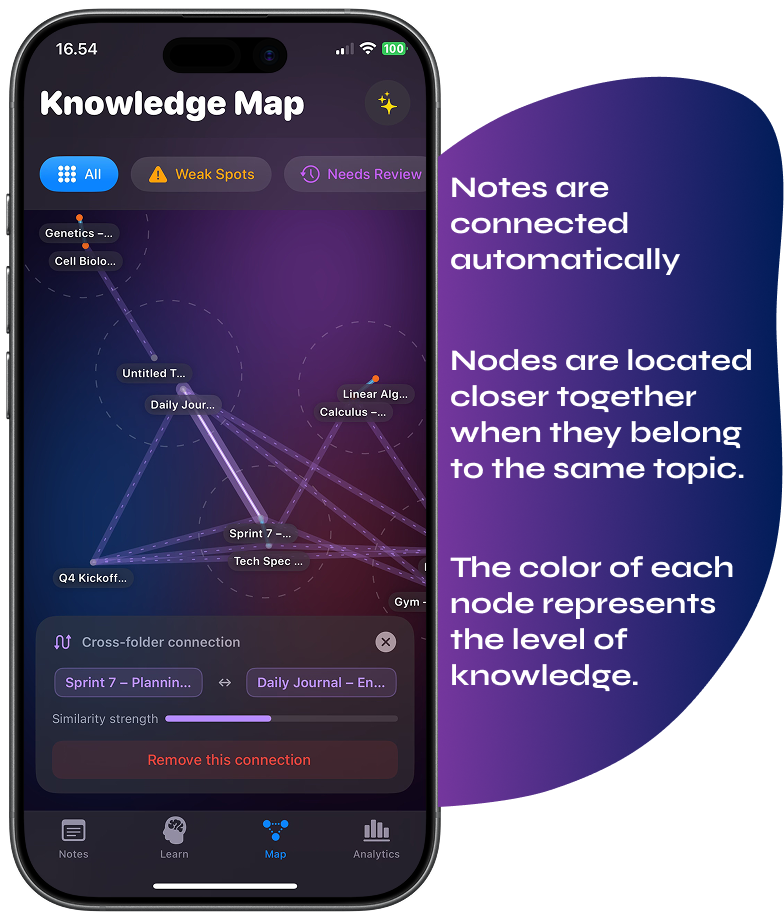
Wisen builds a visual, interactive knowledge graph from your notes automatically. Crucially, it does not rely on tags you assigned, folders you created, or links you manually drew between pages. Instead, it works from the actual semantic content of what you wrote.
To do this, Wisen uses on-device word embeddings — specifically Apple’s NLEmbedding framework. That framework generates 300-dimensional vectors representing the meaning of text. Each note then receives a weighted document vector: content words score at 1.5×, while common words score at 1.0×. Finally, cosine similarity between those vectors determines whether two notes relate conceptually. Notes above the minimum similarity threshold appear as connected nodes; those below do not.
“The graph doesn’t care that one note came from a psychology lecture and another from a product strategy meeting. If they are saying something similar, it will find that — and show it to you.”
What the Graph Actually Shows You
In practice, the result is a visual constellation of your ideas. Notes that share meaning cluster together. Furthermore, bridge nodes — notes that connect ideas from different clusters — receive specific highlighting. Cross-domain connections, after all, are often where the most original thinking happens.
Beyond connections, the graph also surfaces “weak spots”: notes whose content you haven’t reviewed recently, or that you consistently struggled with during AI study sessions. Colour-coding makes these visible at a glance — so you can see not just what you know, but precisely where your understanding is thin.
Built for Large Libraries
Performance deserves a mention here, because graphs with hundreds of nodes can get sluggish fast. Wisen handles this with a single Canvas pass for all edges and dots — rather than individual SwiftUI views per node. Additionally, viewport culling keeps label overlays lean, and a debounced recalculation system only re-processes the graph when your note count actually changes, not on every small edit or XP update. Even with a large library, the experience stays smooth.
AI Study Sessions That Know What You Don’t Know
Most AI tools attached to note apps work like chatbots — you ask questions about your notes, and they answer. That is useful. However, it is not learning. Learning requires information to travel in the other direction: from you to the system, in the form of recall attempts.
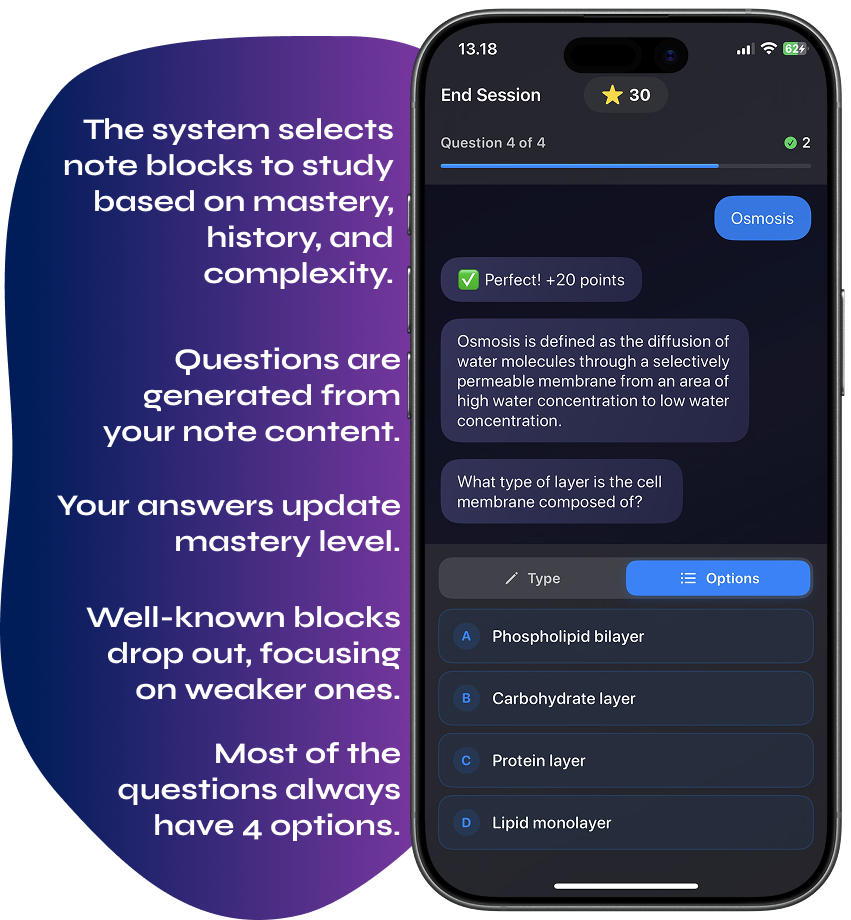
Wisen’s AI study sessions work differently. The system selects which notes to study based on mastery levels, review history, and block complexity scores. It then generates questions via the OpenAI Chat Completions API, using your note content as context. Next, it asks them in a chat-style interface, evaluates your free-text answers, and updates mastery levels accordingly.
What Sets It Apart From Flashcard Apps
- Block-level mastery tracking. Wisen tracks mastery per content block, not per note. A note with five blocks might have three mastered and two weak — and the system focuses exactly on those two
- Session sizing based on content complexity. Wisen analyses blocks using Apple’s NaturalLanguage framework to estimate how many distinct questions each one can generate. Sessions scale accordingly — up to 10 questions, distributed across blocks by complexity and priority
- Intelligent question rules. The AI never asks “mirror” questions (if it tested A→B, it won’t then ask B→A in the same session), never asks meta questions about the note itself, and always includes exactly four answer options per multiple-choice question — which the app then shuffles before displaying
- Lenient, content-grounded scoring. The AI credits partial understanding expressed in your own words. It only offers corrections when an answer is clearly wrong according to your note content — not simply because it doesn’t match a model answer exactly
Blocks that reach a mastery level of 30 or above drop out of future sessions. Consequently, the system naturally shifts focus toward what you still need to work on, rather than re-drilling things you already know well.
Echo: The Resurfacing System That Doesn’t Drill You
Not every note needs active study. Some notes are references — a useful framework, a quote that reframes a problem, a half-formed idea you want to return to. For those, you do not need to recite the content from memory. You simply need it to appear at the right moment.
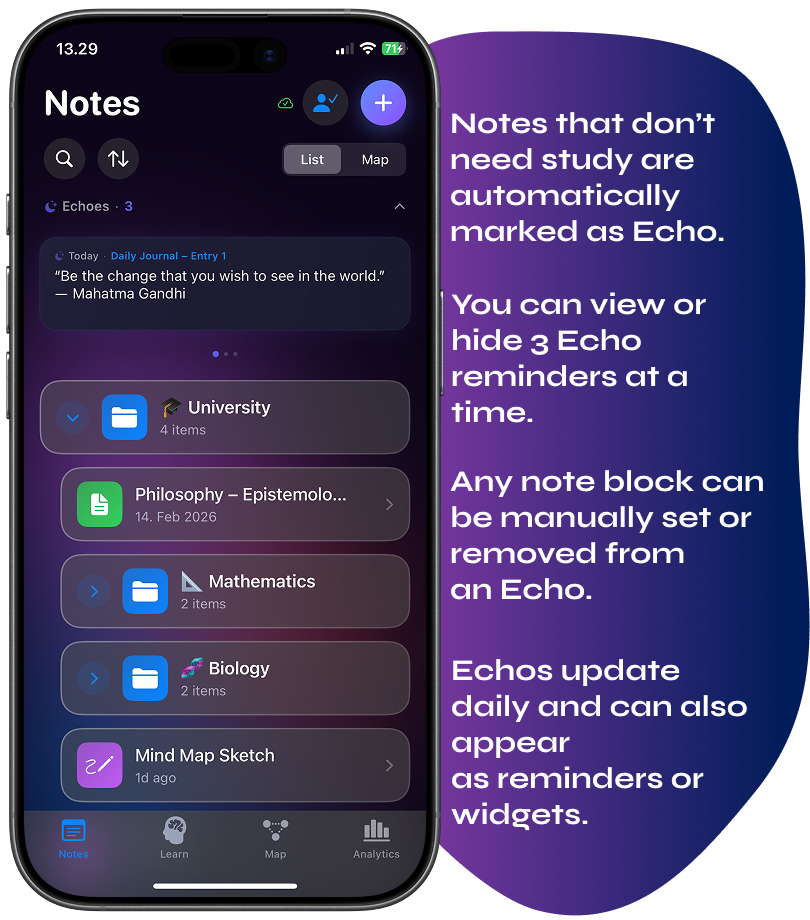
That is precisely what the Echo system is for. Rather than scheduling quiz sessions for every block, Echo classifies content across eight academic domains and a continuous study/echo axis. It then resurfaces notes as gentle reminders — in-app cards and home-screen widgets — on a rotation cycle.
Every block cycles through the Echo rotation exactly once before repeating, so nothing ever disappears permanently. The in-app carousel shows you what is due for resurfacing. Moreover, the WidgetKit extension pushes reminders to your home screen at 06:00, 12:00, and 18:00 — tapping a widget card opens the note directly via deep link.
“The note you saved three months ago about a useful decision-making framework will reappear — not because you searched for it, but because the system decided it was time.”
This reflects a meaningful design choice. Most spaced-repetition systems treat everything as something to memorise. Echo acknowledges that a large portion of what people capture doesn’t need memorising — it just needs to not disappear. The distinction sounds subtle, but in practice it is the difference between a system you use and one you abandon.
Gamification That Actually Makes You Open the App
Gamification in productivity apps has a bad reputation, mostly because developers do it badly. Points for points’ sake, badges that mean nothing, streaks that punish you for missing one day — none of that changes behaviour. It just adds noise.
By contrast, Wisen’s gamification layer ties directly to learning outcomes rather than app-engagement metrics. You earn XP through AI study sessions. The combo multiplier rewards consistent correct answers in sequence, boosting XP per correct answer up to a maximum of 3×. This encourages focused, accurate recall rather than rushed guessing. Additionally, the system sets daily goals based on your recent activity level — not a fixed arbitrary target.
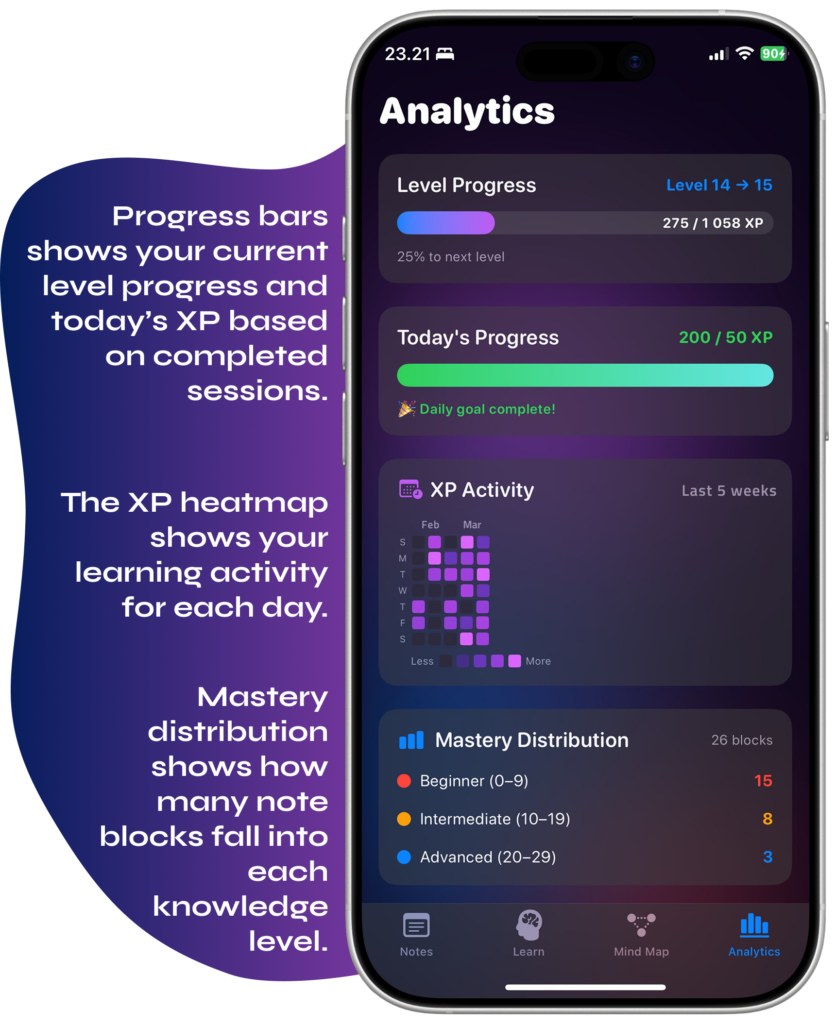
The analytics view gives you a real picture of how your learning progresses over time. It includes an XP heatmap, mastery distribution chart, learning journey timeline, and weak-spot list — showing which notes you know well, which are fading, and where you haven’t returned in a while. This is genuinely useful data, not just decoration.
Wisen vs Traditional Note-Taking Apps — A Direct Comparison
It is worth being direct about where Wisen fits relative to the tools most people already use. Wisen does not try to replace everything — but there are specific things it does that no standard notes app currently offers.
| Feature | Notion / Apple Notes / Bear | Obsidian (with plugins) | Wisen |
|---|---|---|---|
| Capture: typed notes | ✅ Excellent | ✅ Excellent | ✅ Full block editor |
| Capture: voice, scan, PDF | ⚠️ Partial / third-party | ❌ Not built-in | ✅ Native, all formats |
| Search and retrieval | ✅ Strong | ✅ Strong | ✅ Strong |
| Automatic semantic note linking | ❌ | ⚠️ Plugin-dependent, manual | ✅ On-device, automatic |
| Visual knowledge graph | ❌ | ✅ (local graph view) | ✅ Mastery-coloured, interactive |
| Per-block mastery tracking | ❌ | ❌ | ✅ Block-level SRS |
| AI-powered study sessions | ❌ | ❌ | ✅ Adaptive, content-grounded |
| Spaced repetition resurfacing | ❌ | ⚠️ Plugin only | ✅ Echo system, home widget |
| Learning analytics | ❌ | ❌ | ✅ XP, heatmap, weak spots |
| iOS / mobile experience | ⚠️ Variable | ⚠️ Limited mobile | ✅ Native SwiftUI, iOS-first |
| End-to-end encrypted cloud sync | ⚠️ Provider-dependent | ⚠️ Plugin-dependent | ✅ AES-256-GCM, zero-knowledge |
Obsidian is probably the most relevant comparison for people already thinking about knowledge graphs. It is a powerful tool. However, it requires significant setup, plugin management, and manual effort to build links — and it does nothing for active recall or retention. In contrast, Wisen’s graph builds itself, and the learning system sits directly on top of it. The gap between capturing and knowing is what Wisen specifically closes.
Who Gets the Most Out of Wisen
Wisen is not a general-purpose notes replacement. Rather, it is a learning system built around notes. The people who get the most out of it already capture a lot — and feel frustrated that their notes never do anything useful after they write them.
- University students who take lecture notes, save readings, and need to convert all of it into exam-ready knowledge — not just a growing folder of PDFs
- Self-directed learners working across multiple domains simultaneously (languages, science, history, design) who have never had a single system that connects everything and helps them retain it
- Professionals who attend meetings, read industry reports, and save insights — and need those insights to surface when relevant, rather than disappearing into a Notion database they never reopen
- Anyone who has tried Anki or flashcard apps but found the manual card-creation process too time-consuming to sustain — Wisen generates questions automatically from your existing notes
- People who prefer to think out loud — voice notes are a first-class input in Wisen, transcribed in real time, parsed into structured blocks, and included in the same knowledge graph as everything else
Who Should Look Elsewhere
It is also worth being clear about who Wisen probably does not suit — at least not as a primary tool. Teams doing collaborative project management will find better options elsewhere. Similarly, people who need heavy database functionality will get more from Notion. Users who want a plain writing environment with no learning-system features will find Wisen’s structure unnecessary. In summary, Wisen works best when the notes you take are things you want to actually know — not just store.
Frequently Asked Questions About Wisen
Not exactly. Wisen focuses specifically on learning and retention, so it works best as a companion to your existing notes workflow — or as a replacement for people whose main frustration is that their notes never convert into retained knowledge. If you need databases, team collaboration, or project management features, Notion remains the better tool for that side of things.
The AI study sessions use the OpenAI Chat Completions API, which does involve sending your note content to OpenAI’s servers for question generation and answer evaluation. The knowledge graph and Echo resurfacing system, however, run entirely on-device using Apple’s NaturalLanguage framework — no external API call is needed for those features. If you enable cloud sync, Wisen applies end-to-end AES-256-GCM encryption before data leaves your device, meaning even the sync server cannot read your notes.
No. You take notes exactly as you normally would. The knowledge graph builds itself in the background using semantic analysis of your note content. You do not need to add tags, draw manual links, or reorganise anything. The graph updates automatically when you add or edit notes, with a short debounce delay to avoid unnecessary recalculation.
Echo is Wisen’s resurfacing system for notes that don’t need memorising — they just need to not disappear. Rather than scheduling active quiz sessions, Echo classifies content and resurfaces notes as home-screen widget reminders and in-app cards on a rotating cycle. It suits reference-style content: useful frameworks, interesting quotes, half-formed ideas. Standard spaced repetition — which Wisen also includes for mastery-tracked blocks — handles content you actively want to commit to memory.
Yes, and that is actually one of its strengths. The knowledge graph works across your entire library simultaneously — it will surface connections between a note from a biology lecture and a note from a business book if they share semantic meaning, regardless of what folder they live in. Wisen specifically identifies these cross-domain connections as bridge nodes in the graph view.
Currently Wisen is iOS only, built natively in SwiftUI. There is no Android or desktop version announced at the time of writing. The iOS-first approach lets the app take full advantage of platform-specific features like PencilKit for drawings, Vision framework for OCR, and WidgetKit for home-screen Echo reminders.
The shift from static to active notes is not really about technology. Ultimately, it is about what you believe notes are for. If notes are a memory backup — somewhere to put things so you don’t have to remember them — then a folder system is fine. If, however, notes are a thinking tool — something that should help you understand more deeply and retain what you learn — then the folder system is exactly the wrong design.
Wisen serves the second view. It operates on the belief that the notes you take are the raw material for knowledge. That raw material, therefore, deserves a system that actually does something with it.
Your notes are already good. The system holding them just hasn’t been doing its job.
Leave a Reply